Email Deliverability Guide 2026
Why do some emails land in the inbox while others go to spam? This guide explains every factor that affects email deliverability in 2026.
MailPilot - 99.2% Inbox Placement
The top-rated email warmup tool with 8,400+ real mailboxes, Gmail & Outlook OAuth, SPF/DKIM/DMARC monitoring, and the highest inbox placement rate we tested. Trusted by 340+ companies.
What is Email Deliverability?
Email deliverability is the ability to land in the primary inbox - not the spam folder or the promotions tab. It's distinct from email delivery, which only means the mail server accepted the message.
Poor deliverability is invisible: your platform reports “delivered” for every email that wasn't bounced, but never whether it hit the inbox or spam. That's why measuring actual inbox placement matters.
The Five Pillars of Email Deliverability
1. Email Authentication (SPF, DKIM, DMARC)
Authentication records are the foundation. Without them, ISPs have no cryptographic proof that your email is legitimate.
- SPF - Specifies which mail servers are authorized to send email for your domain
- DKIM - Adds a cryptographic signature to every email that recipients can verify
- DMARC - Tells ISPs what to do when emails fail SPF or DKIM checks
See our complete SPF/DKIM/DMARC guide for setup instructions.
2. Sender Reputation
Your domain and IP reputation is built over time through consistent, legitimate sending. Factors that build positive reputation: high open rates, replies, and emails being marked as important. Factors that damage reputation: spam complaints, bounces, and being added to blacklists.
Email warmup is the primary tool for building sender reputation on new accounts and domains.
3. Email Content and Engagement
ISPs analyze your email content for spam indicators. Modern spam filters look at:
- Spam trigger words in subject lines and body
- Image-to-text ratio (all-image emails trigger spam filters)
- Link quantity and destination reputation
- HTML complexity and hidden text
- Engagement history with similar content from your domain
Plain text emails generally have higher deliverability than heavily HTML-formatted marketing emails, particularly for cold email.
4. List Quality
Sending to invalid email addresses or unengaged contacts hurts deliverability.
- Bounce rate - Hard bounces (invalid addresses) should be below 2%. Higher rates signal a dirty list.
- Spam complaint rate - Google enforces a 0.1% threshold. Exceeding it causes deliverability degradation.
- List age - Old lists have higher invalid address rates. Verify before sending.
5. Sending Infrastructure
Your sending IP's reputation matters as much as your domain reputation. If you're on a shared IP (common with email service providers), other senders' behavior affects you. If you have a dedicated IP, you control your own reputation.
For cold email, dedicated sending domains (separate from your main business domain) are essential. Never cold email from your primary business domain - if it gets blacklisted, your normal business email is compromised.
How Gmail's Spam Filter Works in 2026
Gmail uses machine learning to evaluate every email across hundreds of signals. Key factors in 2026:
- Spam rate threshold: Google enforces a 0.1% complaint rate for bulk senders. Exceed this and deliverability degrades.
- One-click unsubscribe: Required for bulk senders since 2024. Gmail specifically checks for this.
- Domain reputation: New domains without sending history face maximum scrutiny.
- Prior engagement: Recipients who previously opened or replied to your emails are much more likely to receive future emails in the inbox.
See our dedicated guide on Gmail spam rates and thresholds.
Monitor Your Deliverability with MailPilot
Real-time inbox placement tracking, authentication monitoring, and 8,400+ mailbox warmup. 7-day free trial.
Common Deliverability Problems and Solutions
Problem: Emails going to spam on Gmail
Causes: Missing or broken authentication, low sender reputation, high spam complaint rate, spammy content.
Solutions: Verify SPF/DKIM/DMARC with Google Postmaster Tools, warm up the sending account, check spam complaint rate, review content for spam triggers.
Problem: Emails going to Junk on Outlook
Causes: Microsoft SmartScreen is aggressive about new senders. Missing DMARC policy, low reputation.
Solutions: Ensure DMARC is set to at least "p=none" with reporting, register your domain with Microsoft SNDS (Smart Network Data Services), warm up longer before Outlook sending.
Problem: High bounce rate
Causes: Dirty email list, purchased lists, scraped data.
Solutions: Use an email verification service before sending, remove hard bounces immediately, source contacts from engaged audiences.
Problem: Low open rates despite inbox placement
Causes: Poor subject lines, wrong send timing, misaligned audience.
Solutions:A/B test subject lines, test send times, improve personalization. Note: deliverability tools can't fix engagement problems - that requires content and targeting work.
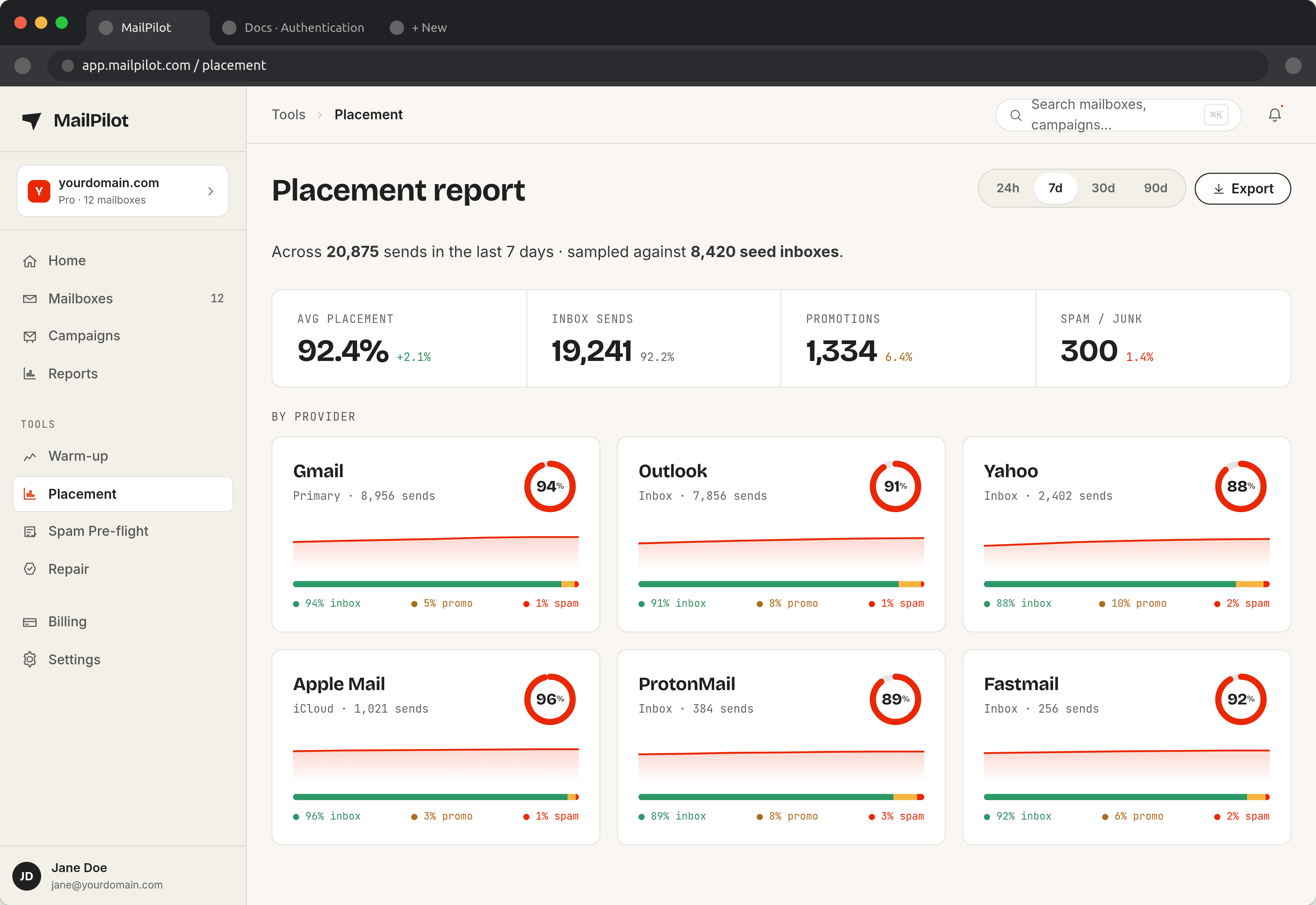
Measuring Your Deliverability
Key metrics to track:
- Inbox placement rate - Track with a tool like MailPilot; aim for 90%+
- Spam complaint rate - Check via Google Postmaster Tools; keep below 0.08%
- Bounce rate - Keep hard bounces below 2%
- Blacklist status - Check MXToolbox regularly
- Authentication health - Monitor SPF/DKIM/DMARC with MailPilot or Google Postmaster
No Credit Card Required
Warm Up Unlimited Mailboxes — Free for 7 Days
Start free for 7 days — unlimited mailboxes, 500 warmup emails a day, no credit card. Unlike per-mailbox tools, MailPilot never charges by mailbox: every plan includes unlimited mailboxes and you pick your daily sending volume. From $9/month.
8,400+ real mailboxes · 99.2% inbox placement · 340+ companies trust it
Email Deliverability FAQ
For cold email, a good inbox placement rate is 85%+. Excellent is 95%+. Anything below 70% indicates a serious deliverability problem. With proper warmup using MailPilot and correct authentication, most senders achieve 90-99% inbox placement.